No internet needed for local billing
Work on a single Windows or Android device, or connect your team over local Wi-Fi or LAN. No mandatory cloud hosting.
 AbhiPOSS
One Windows counter. One standalone Android device. Or a connected team using your own outlet network. Bring billing, kitchen orders and reports together, with local records under your control and no mandatory cloud hosting.
Why AbhiPOSS
Staff get a clearer way to work. Owners get better control over sales, payments, permissions, and daily closing. Restaurant Edition delivers the complete workflow today.
Work on a single Windows or Android device, or connect your team over local Wi-Fi or LAN. No mandatory cloud hosting.
Choose where outlet records stay instead of making every billing day depend on a third-party cloud.
Restaurant Edition brings orders, KOT, kitchen progress, payments, receipts, shifts, and reports into one flow.
Start at Rs. 599/month or Rs. 5,999/year per outlet with a 30-day Restaurant Edition trial and clearly defined licence limits.
Available today: Restaurant Edition
The current demo uses your restaurant operating style to show one complete order and verify where staff, kitchen, payment, printing, tax, and reporting responsibilities meet.
Request an outlet-specific walkthroughSet up the menu, taxes, users, counters, tables, and printer routes.
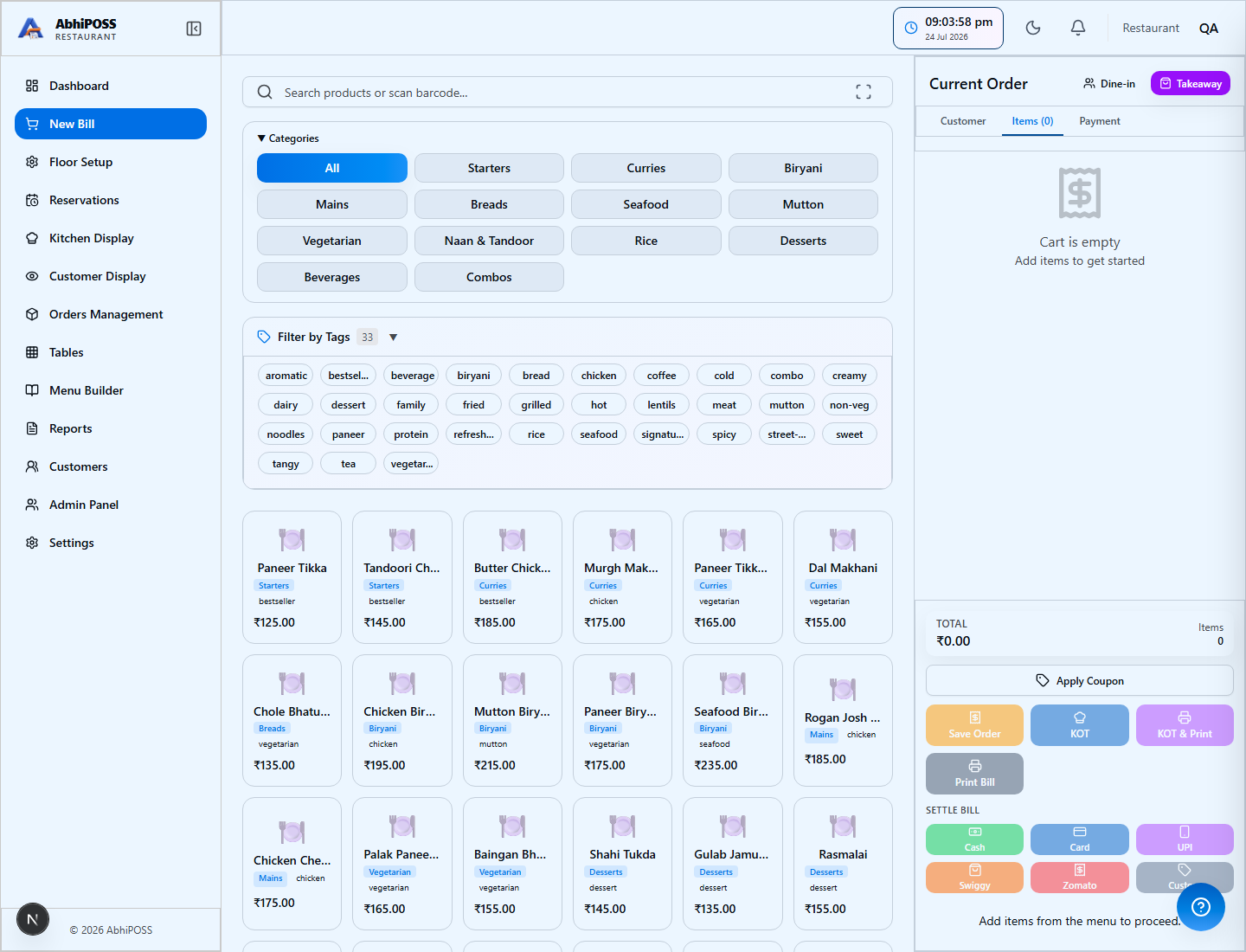
Create dine-in, takeaway, or counter orders from the billing workspace.
Route preparation tickets to a printer, KDS, or both based on the outlet workflow.
Move work through confirmed, preparing, ready, and served states.
Collect payment, finalize the invoice, and print or reprint the customer receipt.
Reconcile shifts, payments, taxes, unresolved orders, and the business day.
Actual AbhiPOSS screens
See a demo order move between five separately signed-in roles on one store server, from the cashier to the kitchen, pickup display and sales records.
Items, quantities and the linked order are visible in the billing workspace. The cashier works from their own signed-in account.

Captured 6 September 2026 from the running Restaurant Edition. Demo menu and accounts, not customer records. Browser sessions connected to one local server; these images are not Android APK captures.
Operational confidence
Keep staff permissions, printers, shifts, tax totals, recovery, and day-close in the same operating system as billing. Problems are easier to find, and responsibilities stay clear.
Confidence in everyday work
Automated restaurant checks cover staff roles, orders, kitchen progress, payments, refunds and day-close. Ask to see the same workflow using your menu.
Staff permissions, audit history and safeguards for finalized bills help owners review who did what and protect completed transactions.
Backup, recovery and health tools help you look after local records. We confirm the recovery options for your Windows or Android setup during onboarding.
Automated results were recorded on 4 September 2026. Device, printer and outlet setup acceptance is confirmed separately; these checks do not guarantee uninterrupted operation on every setup.
Use the devices you already have
Choose a standalone counter or an on-premises setup connecting your staff's devices. In a shared setup, the Windows store server holds your records and serves your local Windows, Android and browser terminals. No public internet needed for local POS operations.
Single device
Run the cashier's billing, compatible printers, stock and reports on one computer at the outlet.
Standalone Android
Make a compatible phone or tablet your billing counter. A compact setup for cafes, takeaway counters and small outlets.
Your outlet network
Connect Windows and browser terminals to one Windows store server for a shared view of your outlet's work.
Multiple Android devices
Equip waiters, cashiers and kitchen staff with Android terminals connected to the same Windows store server.
Compare what matters
This describes typical product models, not every vendor. Confirm exact capabilities, offline behaviour, integrations, and charges during evaluation.
AbhiPOSS: Businesses wanting an adaptable, local-first platform, starting with the available Restaurant Edition.
Hosted suite: Teams prioritizing a large integration ecosystem and centrally managed hosted services.
Basic app: Small counters that only need straightforward invoice and receipt creation.
AbhiPOSS: Outlet records can remain on the customer's device or store server.
Hosted suite: Hosting, retention, export, and recovery follow the provider's service model.
Basic app: Local storage may be available; backup and recovery capabilities vary.
AbhiPOSS: The main Windows counter or standalone Android terminal can continue locally.
Hosted suite: Offline behaviour depends on the provider, subscribed product, and local components.
Basic app: Local billing may continue when the application and database are installed on the device.
AbhiPOSS: Restaurant Edition includes billing, tables, KOT, KDS, customer display, settlement, shifts, and reports; future editions add their own workflows.
Hosted suite: Often broad, with capabilities determined by plans, add-ons, and integrations.
Basic app: Usually billing-focused, with limited kitchen or floor coordination.
AbhiPOSS: Windows, standalone or remote Android, and connected browser terminals.
Hosted suite: Usually browser or managed-app access across supported devices.
Basic app: Commonly designed around one device or one counter style.
AbhiPOSS: Starts at Rs. 599/month or Rs. 5,999/year per outlet, with no per-counter licence penalty.
Hosted suite: May vary by outlet, plan, integration, hardware, user, and support level.
Basic app: Often the lowest entry cost when advanced operations are unnecessary.
Restaurant formats
Enable the screens and operating steps the team actually uses. KDS, customer display, tables, reservations, and printed KOT workflows are configurable.
Explore Restaurant EditionFast order entry, tokens, KOT printing, compact counters, and direct settlement.
Tables, running orders, kitchen coordination, transfer, settlement, and day-close.
Counter billing, modifiers, availability, preparation tickets, and popular-item review.
KOT-first preparation, packing printer routes, order status, and recorded delivery payment tracking.
Affordable Windows or Android counters with thermal printing and shift control.
Running orders, supervisor controls, temporary terminals, and reconciliation.
Real product screens
These screenshots show Restaurant Edition. A live demo verifies the complete workflow using your outlet style, menu, roles, counters, and printer requirements.
Create the order, apply permitted adjustments, send KOT, settle payment, and print from one focused workspace.
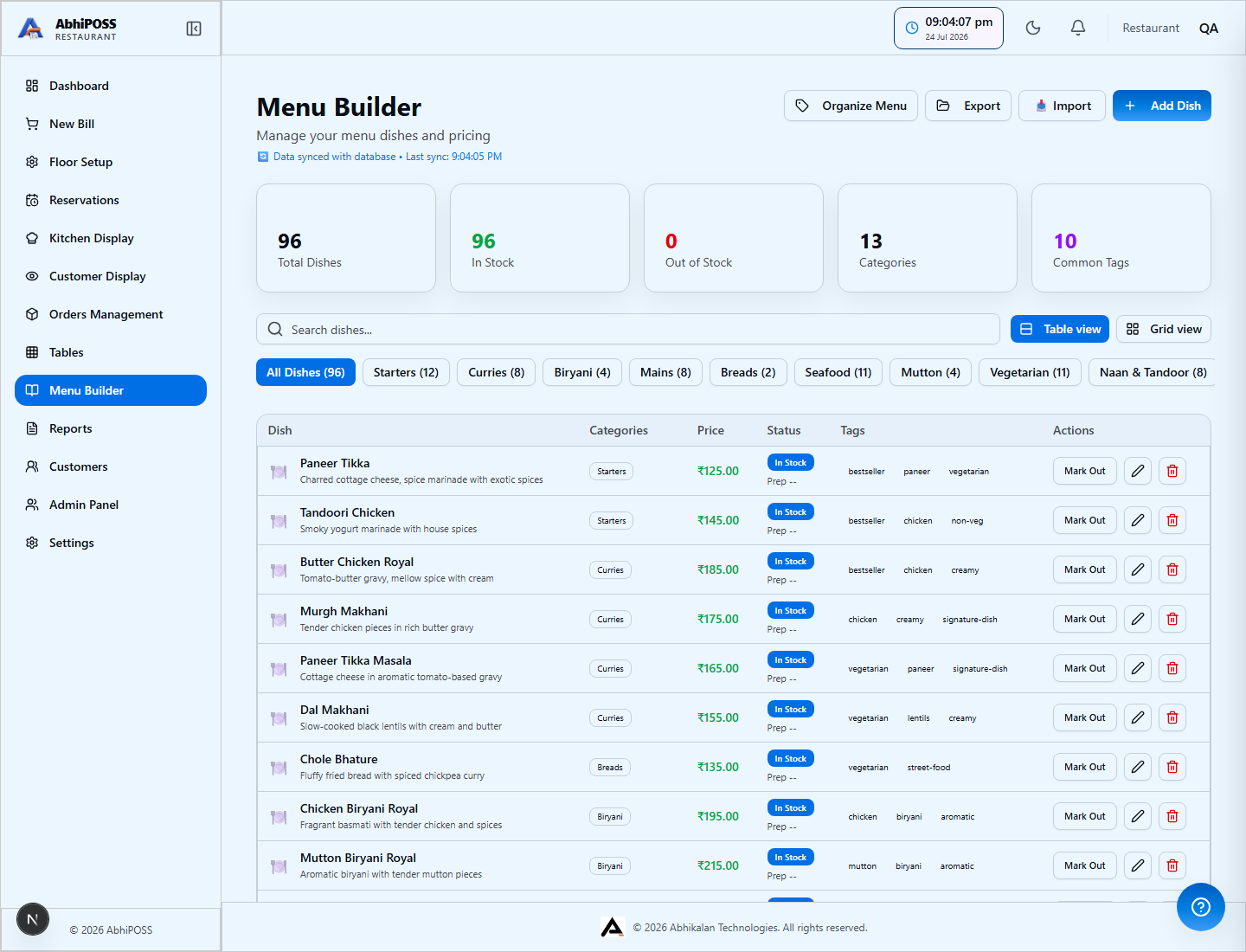
Maintain menu items, prices, categories, tags, add-ons, allergens, availability, and selling details.
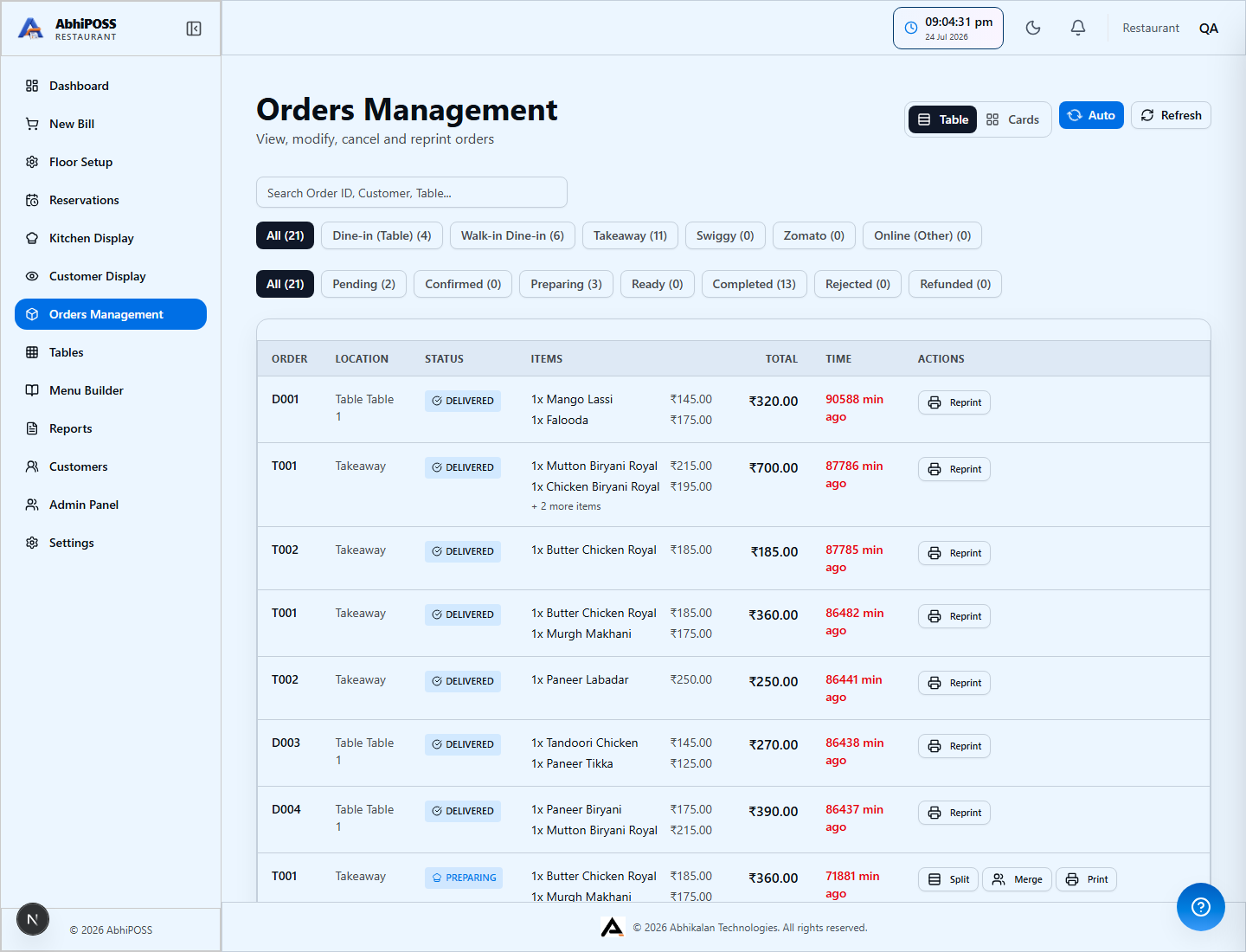
Review the business day's active and completed orders, service status, payment state, and available actions.
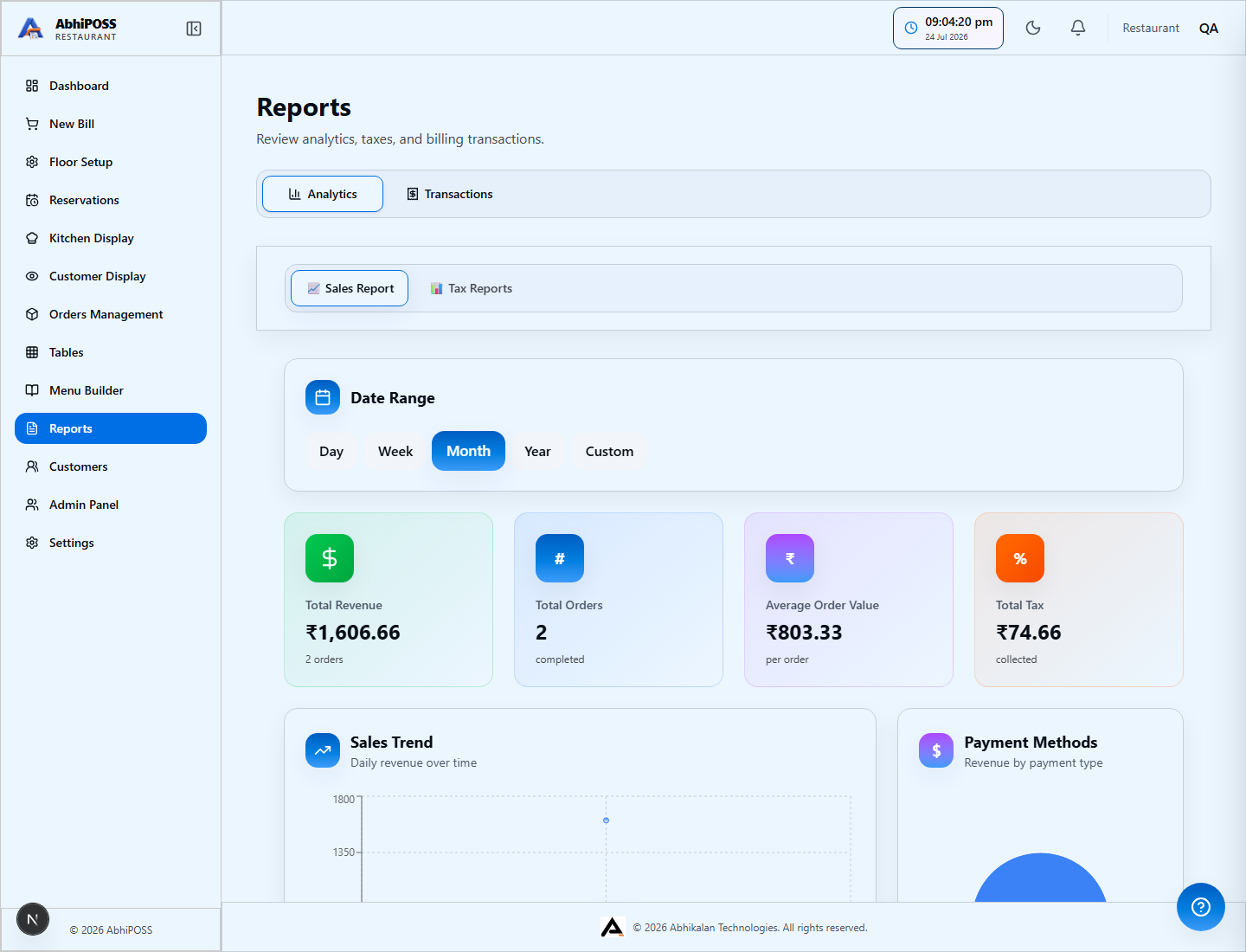
Inspect sales, transactions, payment mix, GST summaries, and accountant-ready exports.
Straightforward outlet pricing
One outlet licence covers the counters, devices, users, and Restaurant Edition features stated in the issued licence and agreed rollout. Hardware, on-site work, custom integrations, and migration are scoped separately.
Restaurant Edition is available now. Grocery, retail, pharmacy, electronics, and other specialist editions are coming soon and are clearly identified as future releases.
Restaurant businesses can see menu selection, KOT, kitchen status, settlement, printing, tax reporting, shifts, and day-close end to end. Other businesses can register interest in the edition planned for their industry.